
- Architectural Differences: ERP vs Standalone SaaS
- Comprehensive 10-Point Feature Matrix
- Deep Dive: Odoo Accounting Strengths & Limits
- Deep Dive: QuickBooks Online Strengths & Limits
- Deep Dive: Xero Strengths & Limits
- Total Cost of Ownership (3-Year Pricing Breakdown)
- Migration Blueprint: Transitioning to Odoo
- Final Decision Framework & Verdict
1. Architectural Differences: ERP vs Standalone SaaS Accounting
The core difference between these platforms lies in software architecture:
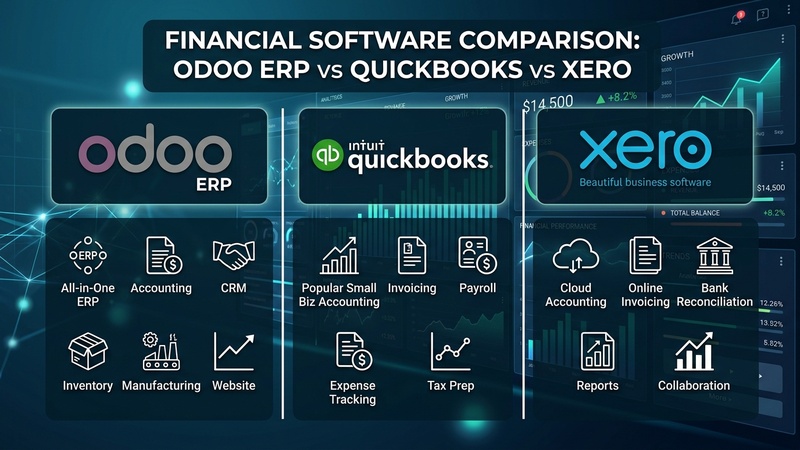
- QuickBooks Online & Xero: Standalone accounting engines. They manage ledgers, customer invoices, and basic inventory. However, tracking complex warehouse operations, manufacturing, CRM pipelines, or point-of-sale requires purchasing separate third-party SaaS apps and connecting them via Zapier or API plugins — creating potential sync errors and recurring subscription stacks.
- Odoo Accounting: An integrated component of a full ERP ecosystem. In Odoo, sales quotations automatically transform into customer invoices, warehouse goods movements generate real-time stock valuation journal entries, and POS transactions auto-reconcile cash drawers — all inside a single database without external sync plugins.
2. Comprehensive 10-Point Feature Matrix
| Feature / Metric | Odoo Accounting | QuickBooks Online | Xero |
|---|---|---|---|
| Double-Entry Compliance | ✅ GAAP & IFRS Full | ✅ GAAP Full | ✅ GAAP & IFRS Full |
| Native ERP Integration | ✅ Native (CRM, POS, MRP) | ❌ Requires Third-Party Apps | ❌ Requires Third-Party Apps |
| Multi-Currency Support | ✅ Included in All Plans | ⚠️ Plus/Advanced Tiers Only | ⚠️ Established Tier Only |
| Self-Hosting & Data Control | ✅ Open Source / Self-Hosted | ❌ Closed Proprietary SaaS | ❌ Closed Proprietary SaaS |
| Automated Reconciliation Rules | ✅ Advanced Regex & Matching | Moderate Rule Engine | Moderate Rule Engine |
| Analytic / Cost Center Accounting | ✅ Multi-Dimensional Plans | ⚠️ Basic Class Tracking | ⚠️ Tracking Categories (2 max) |
| Automated Deferred Revenue | ✅ Built-in Recognition | ⚠️ Advanced Tier Only | ❌ Requires Third-Party Addon |
| Batch Payments & SEPA XML | ✅ Native Support | ⚠️ Addon Required | ✅ Included in High Tiers |
3. Deep Dive: Odoo Accounting Strengths & Limits
Key Advantages
- Unified Data Model: Invoicing, payments, and stock valuation post automatically. No manual journal entry synchronization.
- Cost Freedom: Odoo Community edition is completely free to self-host without user seat limits.
- Customizability: Full access to Python source code and Odoo Studio to build custom financial reports, approval workflows, and fields.
Limitations
- Requires basic initial configuration (fiscal localization, chart of accounts setup) compared to plug-and-play SaaS tools.
4. Deep Dive: QuickBooks Online Strengths & Limits
Key Advantages
- Widely recognized by US CPAs and bookkeepers.
- Extensive native US bank feed connections.
Limitations
- Price increases occur frequently; multi-currency and advanced reports are locked behind expensive top-tier subscriptions.
- Weak inventory management for manufacturing or multi-warehouse businesses.
5. Deep Dive: Xero Strengths & Limits
Key Advantages
- Clean user interface designed for non-accountant business owners.
- Strong bank feed reconciliation interface.
Limitations
- Strict limit of 2 tracking categories for cost-center reporting.
- Lacks native manufacturing, warehouse management, and advanced POS capabilities.
6. Total Cost of Ownership (3-Year Pricing Breakdown)
For a growing business with 10 team members requiring accounting, inventory, and sales billing:
- QuickBooks Online (Advanced + Inventory Addons): ~$200/mo = $7,200 over 3 years
- Xero (Established + Inventory Addons): ~$150/mo = $5,400 over 3 years
- Odoo Enterprise (All-Apps Plan): ~$24/user/mo = $2,880 over 3 years
- Odoo Community (Self-Hosted): $0 Software Cost
7. Migration Blueprint: Transitioning to Odoo
Export Master Records
Export Customers, Vendors, Chart of Accounts, and Product catalog from QuickBooks/Xero to CSV format.
Import into Odoo
Go to Accounting > Contacts > Import and Chart of Accounts > Import. Map columns and validate.
Post Opening Journal Balances
Post an Opening Balance Journal Entry as of your fiscal cut-off date to align Trial Balance totals.
8. Final Decision Framework & Verdict
• Choose QuickBooks Online if you are a US sole proprietor or small service business working with a local CPA who mandates QuickBooks.
• Choose Xero if you prioritize a minimal, modern web interface for basic service invoicing.
• Choose Odoo Accounting if you run an e-commerce, wholesale, retail, or manufacturing business that requires seamless inventory, sales, CRM, and accounting in one scalable system without recurring app stacks.
zSmartFix Editorial Team
Step-by-step technical guides tested on real hardware. Our guides are independently written and freely accessible to everyone.
Leave a Reply